以前、REAPERのアップデートに伴い、マウスカーソル下のトラックをソロにして再生するSWSのアクションが使えなくなってしまいました。そこでAIにお願いしてピン留めに対応したスクリプトを作ってもらったのですが、そういえばその後もちょくちょく修正を加えていたので改めて公開し直そうかなと。
ほかにもAIに作ってもらった小物スクリプトがいくつかあるので供養がてら公開させていただきます。
マウスカーソル下のトラックをソロにして再生
2025/9/22に公開したバージョンは、ソロの種類が未設定だったのと、MIDIエディタを開いている時の処理が無かったので、そのあたりをAI様に修正してもらいつつ数ヶ月使い込んでおります。
MainとMIDI、両方からスクリプトを読み込んでショートカットを割り当ててください。
必須の拡張機能
・SWS/S&M extension(ReaPackからインストール)
・js_ReaScriptAPI(ReaPackからインストール)
ソロの種類(ソースの17行目で変更できます)
・soloed in place
MIDIエディタ上で実行したときのアクション(ソースの19行目で変更できます)
・_BR_ME_TOGGLE_PLAY_MOUSE_SOLO_ITEM
(開いているMIDIアイテムをソロ再生)
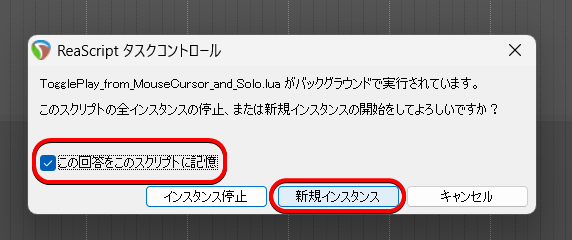
タスクコントロール
・新規インスタンスを記憶させる
|
1 2 3 4 5 6 7 8 9 10 11 12 13 14 15 16 17 18 19 20 21 22 23 24 25 26 27 28 29 30 31 32 33 34 35 36 37 38 39 40 41 42 43 44 45 46 47 48 49 50 51 52 53 54 55 56 57 58 59 60 61 62 63 64 65 66 67 68 69 70 71 72 73 74 75 76 77 78 79 80 81 82 83 84 85 86 87 88 89 90 91 |
-- @description Solo track under mouse and play from mouse cursor, unsolo after stop (stop on re-run, keep edit cursor visually) -- @version 1.1 -- @author ChatGPT -- マウスカーソル下のトラックをソロ再生し、停止時にソロ状態を戻すスクリプト -- MIDIエディタ上だった場合はSWSの「_BR_ME_TOGGLE_PLAY_MOUSE_SOLO_ITEM」を実行 -- SWS、js_ReaScriptAPIが必要 -- MainとMIDI、両方からスクリプトを読み込んでショートカットを割り当ててください -- スクリプトの動作を聞かれたら「新規インスタンス」を選択してください。「インスタンス停止」を選ぶと動作しません local track = nil local set_solo = false local start_pos = nil -- カスタマイズ ---------- -- ソロの種類 0=not soloed, 1=soloed, 2=soloed in place, 5=safe soloed, 6=safe soloed in place local solo_mode = 2 -- マウスがMIDIエディタ上だったときに実行するコマンド local midi_command_id = reaper.NamedCommandLookup("_BR_ME_TOGGLE_PLAY_MOUSE_SOLO_ITEM") -- 停止後にソロ解除 function CheckStop() if reaper.GetPlayState() == 0 then if track and set_solo then reaper.SetMediaTrackInfo_Value(track, "I_SOLO", 0) end else reaper.defer(CheckStop) end end -- メイン処理 function Main() local play_state = reaper.GetPlayState() -- 再生中なら即停止(カーソルは動かさない) if play_state & 1 == 1 then reaper.OnStopButton() return end -- マウスポジション、hwndを取得 local x, y = reaper.GetMousePosition() track = reaper.GetTrackFromPoint(x, y) local hwnd = reaper.JS_Window_FromPoint(x, y) local parent = hwnd -- MIDI Editor上だったときの処理 while parent do local class = reaper.JS_Window_GetClassName(parent) local title = reaper.JS_Window_GetTitle(parent) or "" -- 判定条件(どちらか一致でOK) if class == "midieditor" or title:match("MIDI") then local active_midi_editor = reaper.MIDIEditor_GetActive() reaper.MIDIEditor_OnCommand(active_midi_editor, midi_command_id) return end parent = reaper.JS_Window_GetParent(parent) end -- ソロ再生 if track then local solo_state = reaper.GetMediaTrackInfo_Value(track, "I_SOLO") if solo_state == 0 then reaper.SetMediaTrackInfo_Value(track, "I_SOLO", solo_mode) set_solo = true end -- マウス位置のタイムライン上の時間を取得 start_pos = reaper.BR_PositionAtMouseCursor(true) if start_pos == -1 then start_pos = reaper.GetCursorPosition() end -- 編集カーソルの現在位置を保存 local cur_pos = reaper.GetCursorPosition() -- 編集カーソルを一時的にマウス位置に移動して再生 reaper.SetEditCurPos(start_pos, false, false) reaper.OnPlayButton() -- 再生開始後にカーソルを元に戻す reaper.SetEditCurPos(cur_pos, false, false) reaper.defer(CheckStop) end end Main() |
選択しているノートをルートにしてコードを生成
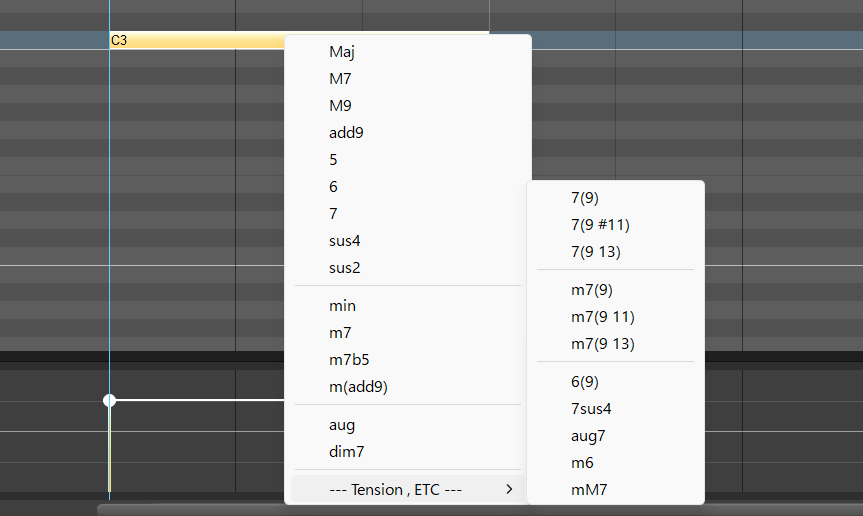
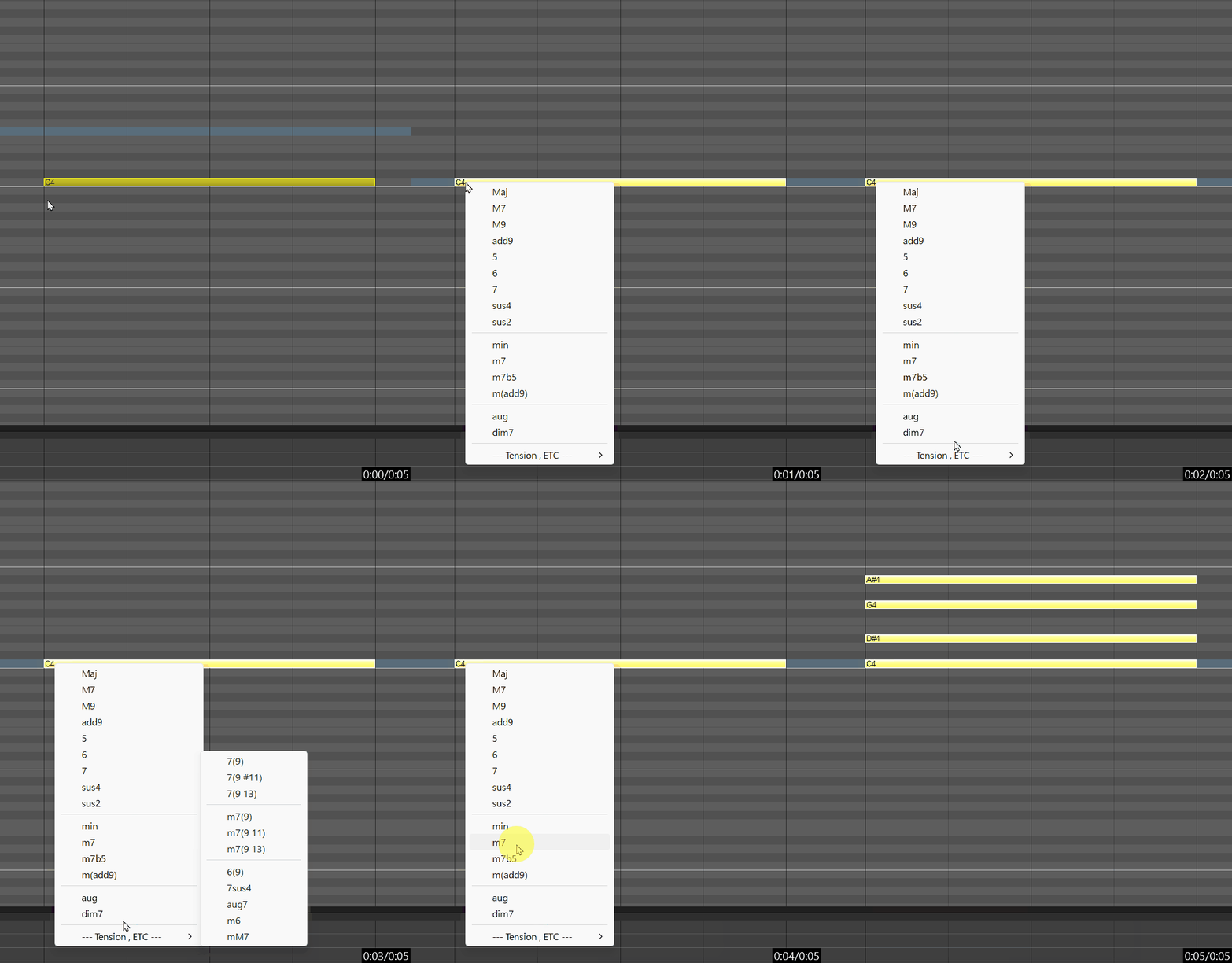
手っ取り早くコードを入力したい時があるかもなぁと思って作ってもらったMIDIエディタ用のスクリプトです。1音選択してスクリプトを実行するとメニューが出るのでコードを選んでください。
メニュー内にセパレータを入れたいがため見苦しいソースになっています。(これは私のせいです)
|
1 2 3 4 5 6 7 8 9 10 11 12 13 14 15 16 17 18 19 20 21 22 23 24 25 26 27 28 29 30 31 32 33 34 35 36 37 38 39 40 41 42 43 44 45 46 47 48 49 50 51 52 53 54 55 56 57 58 59 60 61 62 63 64 65 66 67 68 69 70 71 72 73 74 75 76 77 78 79 80 81 82 83 84 85 86 87 88 89 90 91 92 93 94 95 96 97 98 99 100 101 102 103 104 105 106 107 108 109 110 111 112 113 114 115 116 117 118 119 120 121 122 123 124 125 126 127 128 129 130 131 132 133 134 135 136 137 138 139 140 141 142 143 144 145 146 147 148 149 150 151 152 153 154 155 156 157 158 159 160 161 162 163 164 165 166 167 168 169 170 171 172 173 174 175 176 177 178 179 180 181 182 183 184 185 186 187 188 189 190 191 192 193 194 195 |
-- 選択しているノートをルートにしてコードを生成 -- MIDIエディタ用 local reaper = reaper -- グローバル変数 code_type = "maj" -------------------------------------選択ノートが無ければ終了 -- MIDIエディタを取得 local editor = reaper.MIDIEditor_GetActive() if not editor then reaper.MB("MIDIエディタが開かれていません。", "エラー", 0) return end -- テイクを取得 local take = reaper.MIDIEditor_GetTake(editor) if not take or not reaper.TakeIsMIDI(take) then reaper.MB("有効なMIDIテイクが見つかりません。", "エラー", 0) return end -- 選択されたノートがあるかチェック local noteCount = reaper.MIDI_CountEvts(take) local _, note_idx, selected = nil, 0, false local selected = 0 for i = 0, noteCount - 1 do local retval, sel, _, _, _, _, _, _ = reaper.MIDI_GetNote(take, i) if retval and sel then --selected = true selected = selected + 1 --break end end -- 選択されたノートが1音以外ならばエラーメッセージ if selected == 0 then reaper.MB("選択されたMIDIノートがありません。", "エラー", 0) return end if selected > 1 then reaper.MB("選択されたMIDIノートが2音以上あります。", "エラー", 0) return end -------------------------------------コード一覧メニュー表示 -- コードリスト -- (セパレータとサブメニューは返り値から除かれるがテーブル数には含む) local chords_list = { "Maj", "M7", "M9", "add9", "5", "6", "7", "sus4", "sus2", "", "min", --10(ほんとは11) "m7", "m7b5", "m(add9)", "", "aug", --14(ほんとは16) "dim7", "", ">--- Tension , ETC ---", --17(ほんとは19) "7(9)", "7(9 #11)", "7(9 13)", "", "m7(9)", --19(ほんとは23) "m7(9 11)", "m7(9 13)", "", "6(9)", "7sus4", "aug7", "m6", "mM7", } -- メニュー用に整形(各コード名の間に|を挟む) local menu = table.concat(chords_list, "|") -- メニュー表示 local ret = gfx.showmenu(menu) -- reaper.ShowMessageBox("ret:"..ret, "ret", 0) if ret > 0 then -- セパレータとサブメニューを追加処理 if ret >= 22 then ret = ret + 6 elseif ret >= 19 then ret = ret + 5 elseif ret >= 16 then ret = ret + 4 elseif ret >= 14 then ret = ret + 2 elseif ret >= 10 then ret = ret + 1 end -- 選択されたコードの取得 local selected = chords_list[ret] -- reaper.ShowMessageBox("選択されたコードは:"..selected, "コード選択", 0) code_type = selected else return end -------------------------------------コード生成 --code_type = "7" -- コードタイプとインターバル(半音)テーブル local chord_intervals = { Maj = {0, 4, 7}, min = {0, 3, 7}, M7 = {0, 4, 7, 11}, add9 = {0, 4, 7, 14}, M9 = {0, 4, 7, 11, 14}, sus4 = {0, 5, 7}, sus2 = {0, 2, 7}, ["5"] = {0, 7}, ["6"] = {0, 4, 7, 9}, ["7"] = {0, 4, 7, 10}, m7 = {0, 3, 7, 10}, m7b5 = {0, 3, 6, 10}, ["m(add9)"] = {0, 3, 7, 14}, dim7 = {0, 3, 6, 9}, aug = {0, 4, 8}, ["7(9)"] = {0, 4, 7, 10, 14}, ["7(9 #11)"] = {0, 4, 7, 10, 14, 18}, ["7(9 13)"] = {0, 4, 7, 10, 14, 21}, ["m7(9)"] = {0, 3, 7, 10, 14}, ["m7(9 11)"] = {0, 3, 7, 10, 14, 17}, ["m7(9 13)"] = {0, 3, 7, 10, 14, 21}, ["6(9)"] = {0, 4, 7, 9, 14}, ["7sus4"] = {0, 5, 7, 10}, aug7 = {0, 4, 8, 10}, m6 = {0, 3, 7, 9}, mM7 = {0, 3, 7, 11}, } --local intervals = chord_intervals[code_type:lower()] local intervals = chord_intervals[code_type] if not intervals then reaper.ShowMessageBox("未対応のコードタイプです。", "エラー", 0) return end -- 選択ノートからルートノート取得および、そのノート情報を保存 local note_count = reaper.MIDI_CountEvts(take) local root_note = nil local root_startppqpos = nil local root_endppqpos = nil local root_chan = nil local root_vel = nil for i = 0, note_count - 1 do local retval, selected, muted, startppqpos, endppqpos, chan, pitch, vel = reaper.MIDI_GetNote(take, i) if retval and selected then root_note = pitch root_startppqpos = startppqpos root_endppqpos = endppqpos root_chan = chan root_vel = vel break end end if not root_note then reaper.ShowMessageBox("選択されたノートがありません。", "エラー", 0) return end -- トランザクション開始 reaper.Undo_BeginBlock() reaper.MIDI_DisableSort(take) -- ルートノートを基準にコードの各音を追加(ただしルートは元からあるため追加しない) for _, interval in ipairs(intervals) do local note_pitch = root_note + interval if interval ~= 0 and note_pitch >= 0 and note_pitch <= 127 then -- ノートを追加(長さ・開始位置・ベロシティはルートノートと同じ) reaper.MIDI_InsertNote(take, true, false, root_startppqpos, root_endppqpos, root_chan, note_pitch, root_vel, false) end end reaper.MIDI_Sort(take) reaper.Undo_EndBlock("コード生成: " .. code_type, -1) |
テンキーだけで指定時間にジャンプ
REAPERのジャンプアクション(View: Jump (go) to time window)は時間単位だと:(コロン)を入力する必要があり、それだと片手で素早く入力できないので.(ドット)でジャンプできるものが欲しいなぁ…ってことで作ってもらいました。
作ってもらうたびに「こういった機能を追加した完全版を作りましょうか?」「さらに強化したプロ版を作りましょうか?」と言ってくるのでどんどん機能が追加されましたがまぁ。
ナレーションやセリフ収録等、時間単位で管理される収録のプレイバックで使われることを想定しています。音楽の収録なら小節単位ですからREAPER標準のアクションで賄えますので。
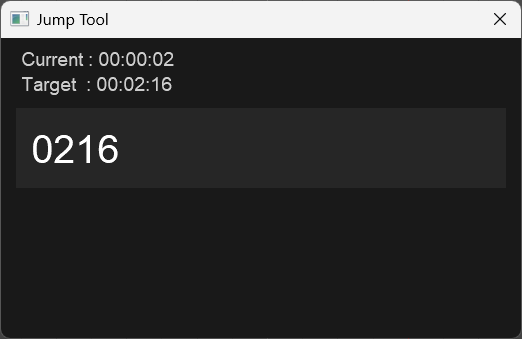
入力書式
・hh.mm.ss / mm.ss / ss / hhmmss / hh:mm:ss / +ss / -ss
|
1 2 3 4 5 6 7 8 9 10 11 12 13 14 15 16 17 18 19 20 21 22 23 24 25 26 27 28 29 30 31 32 33 34 35 36 37 38 39 40 41 42 43 44 45 46 47 48 49 50 51 52 53 54 55 56 57 58 59 60 61 62 63 64 65 66 67 68 69 70 71 72 73 74 75 76 77 78 79 80 81 82 83 84 85 86 87 88 89 90 91 92 93 94 95 96 97 98 99 100 101 102 103 104 105 106 107 108 109 110 111 112 113 114 115 116 117 118 119 120 121 122 123 124 125 126 127 128 129 130 131 132 133 134 135 136 137 138 139 140 141 142 143 144 145 146 147 148 149 150 151 152 153 154 155 156 157 158 159 160 161 162 163 164 165 166 167 168 169 170 171 172 173 174 175 176 177 178 179 180 181 182 183 184 185 186 187 188 189 190 191 192 193 194 195 196 197 198 199 200 201 202 203 204 205 206 207 208 209 210 211 212 213 214 215 216 217 218 219 220 221 222 223 224 225 226 227 228 229 230 231 232 233 234 235 236 237 238 239 240 241 242 243 244 245 246 247 248 249 250 251 252 253 254 255 256 257 258 259 260 261 262 263 264 265 266 267 268 269 270 271 272 273 274 275 276 277 278 279 280 281 282 283 284 285 286 287 288 289 290 291 292 293 294 295 296 297 298 299 300 301 302 303 304 305 306 307 308 309 310 311 312 313 314 315 316 317 318 319 320 321 322 |
-- REAPER Jump Tool -- Format -- hh.mm.ss / mm.ss / ss / hhmmss / hh:mm:ss -- Relative +30 / -10 -- Marker Name -- [機能・特徴] -- テンキーのみで指定時間にジャンプ(.区切り、または区切り無しでもOK) -- 時間入力、相対移動、マーカー名プレビュー -- マウス位置にウィンドウ表示、現在カーソル位置表示、ターゲット位置プレビュー、フォントサイズ大きめ local input="" local cursor_pos=0 local markers={} local marker_index=1 local w,h=520,300 local mx,my=reaper.GetMousePosition() gfx.init("Jump Tool",w,h,0,mx,my) gfx.setfont(1,"Arial",22) gfx.setfont(2,"Arial",44) gfx.setfont(3,"Arial",20) local blink=0 local cursor=true function format_time(sec) if sec<0 then sec=0 end local h=math.floor(sec/3600) local m=math.floor((sec%3600)/60) local s=math.floor(sec%60) return string.format("%02d:%02d:%02d",h,m,s) end function parse_time(str) str=str:gsub(":",".") local parts={} for p in string.gmatch(str,"[^%.]+") do table.insert(parts,tonumber(p)) end if not parts[1] then return nil end local h,m,s=0,0,0 if #parts==3 then h,m,s=parts[1],parts[2],parts[3] elseif #parts==2 then m,s=parts[1],parts[2] else s=parts[1] end return h*3600+m*60+s end function parse_fast_number(str) if not str:match("^%d+$") then return nil end if #str<=2 then return tonumber(str) elseif #str<=4 then local m=tonumber(str:sub(1,-3)) local s=tonumber(str:sub(-2)) return m*60+s else local h=tonumber(str:sub(1,-5)) local m=tonumber(str:sub(-4,-3)) local s=tonumber(str:sub(-2)) return h*3600+m*60+s end end function update_markers() markers={} marker_index=1 if input=="" then return end local _,num,_=reaper.CountProjectMarkers(0) for i=0,num-1 do local _,isrgn,pos,_,name,_ = reaper.EnumProjectMarkers(i) if name and name:lower():find(input:lower()) then table.insert(markers,{pos=pos,name=name}) end end end function insert_char(c) input=input:sub(1,cursor_pos)..c..input:sub(cursor_pos+1) cursor_pos=cursor_pos+1 update_markers() end function backspace() if cursor_pos>0 then input= input:sub(1,cursor_pos-1).. input:sub(cursor_pos+1) cursor_pos=cursor_pos-1 update_markers() end end function delete_char() if cursor_pos < #input then input = input:sub(1,cursor_pos) .. input:sub(cursor_pos+2) update_markers() end end function calc_target() if input=="" then return nil end local cur=reaper.GetCursorPosition() if input:sub(1,1)=="+" then local t=parse_time(input:sub(2)) if t then return cur+t end end if input:sub(1,1)=="-" then local t=parse_time(input:sub(2)) if t then return cur-t end end local fast=parse_fast_number(input) if fast then return fast end local t=parse_time(input) if t then return t end if markers[marker_index] then return markers[marker_index].pos end end function draw() gfx.set(.1,.1,.1,1) gfx.rect(0,0,w,h,1) local cur=reaper.GetCursorPosition() gfx.setfont(1) gfx.set(.8,.8,.8,1) gfx.x=20 gfx.y=10 gfx.drawstr("Current : "..format_time(cur)) local target=calc_target() if target then gfx.x=20 gfx.y=35 gfx.drawstr("Target : "..format_time(target)) end gfx.set(.15,.15,.15,1) gfx.rect(15,70,w-30,80,1) gfx.setfont(2) gfx.set(1,1,1,1) gfx.x=30 gfx.y=90 gfx.drawstr(input) if cursor then local tw=gfx.measurestr( input:sub(1,cursor_pos) ) gfx.rect( 30+tw+3, 95, 4, 42, 1 ) end if #markers>0 then gfx.setfont(3) for i=1,math.min(5,#markers) do local y=160+(i-1)*20 if i==marker_index then gfx.set(.3,.3,.3,1) gfx.rect(20,y-2,w-40,20,1) end gfx.set(1,1,1,1) gfx.x=25 gfx.y=y gfx.drawstr( markers[i].name.." "..format_time(markers[i].pos) ) end end gfx.update() end function jump() local t=calc_target() if t then reaper.SetEditCurPos(t,true,false) end end function loop() local char=gfx.getchar() if char==27 then return end if char==13 then jump() return end if char==8 then backspace() end if char==6579564 then delete_char() end if char==1818584692 then if cursor_pos>0 then cursor_pos=cursor_pos-1 end end if char==1919379572 then if cursor_pos<#input then cursor_pos=cursor_pos+1 end end if char==30064 then if marker_index>1 then marker_index=marker_index-1 end end if char==1685026670 then if marker_index<#markers then marker_index=marker_index+1 end end if char>=32 and char<=126 then insert_char(string.char(char)) end local t=reaper.time_precise() if t-blink>0.5 then cursor=not cursor blink=t end draw() if char>=0 then reaper.defer(loop) end end update_markers() draw() loop() |
「Memo」という名前のトラックにテキストアイテムを挿入
ナレーションやセリフ収録で「今、ノイズ乗ったかも…でも流れ的に止めたくないなぁ」というとき、あとでプレイバックする際に目安となるテキストアイテムがあれば場所がすぐ分かって便利かもなぁ、と思って作ってもらったスクリプトです。
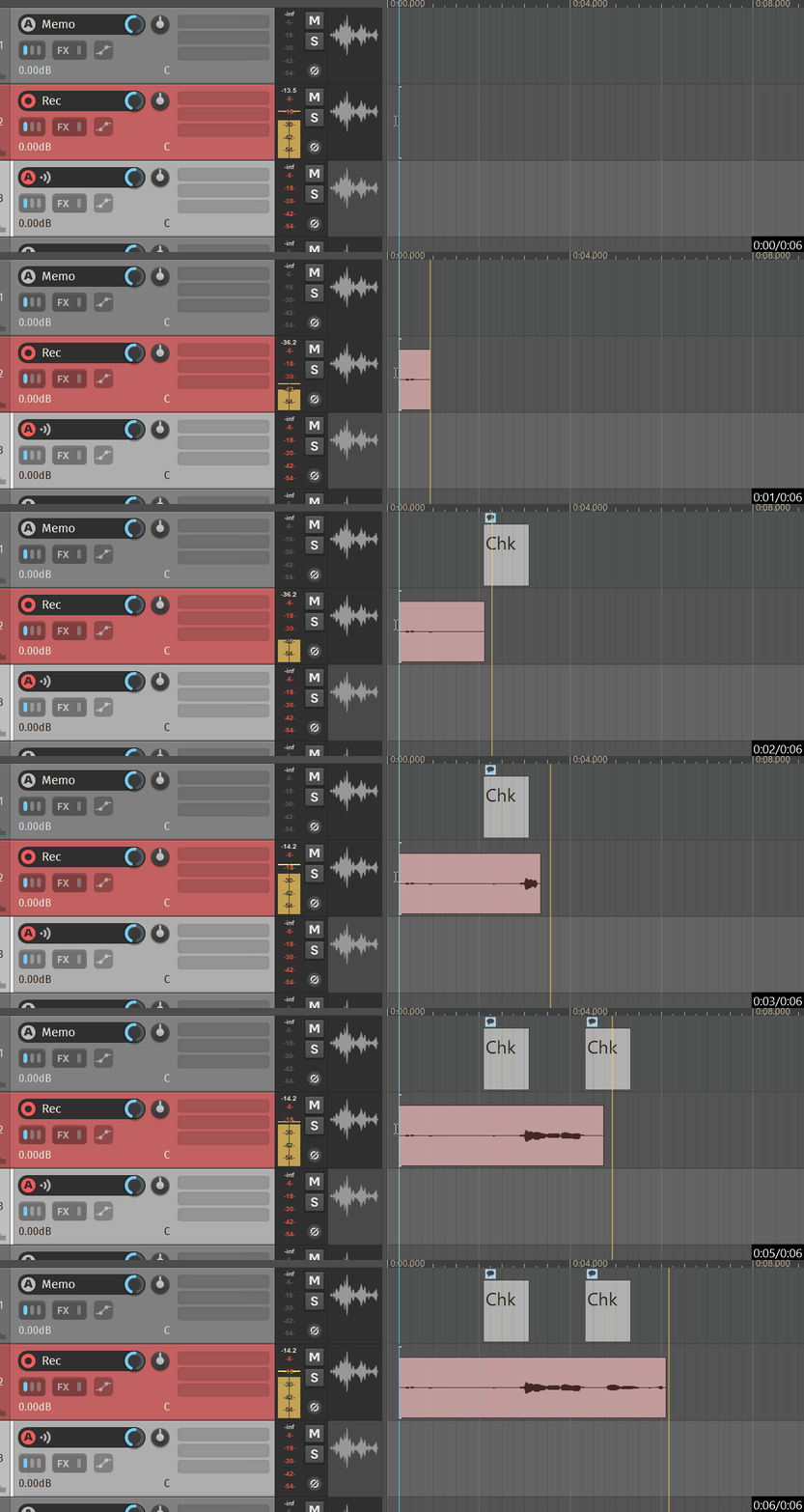
|
1 2 3 4 5 6 7 8 9 10 11 12 13 14 15 16 17 18 19 20 21 22 23 24 25 26 27 28 29 30 31 32 33 34 35 36 37 38 39 40 41 42 43 44 45 46 47 48 49 50 51 52 53 |
--プロンプト --DAWのREAPERで、実行すると「Memo」というトラック名にEmpty Itemを挿入するLuaスクリプトを作ってください。 --Empty Itemは再生中なら再生している位置、停止中ならカーソルの位置でにしてください。 --「Memo」というトラック名のトラックが無ければ何もしないで終了してください。 -- テキストの内容とアイテムの長さを設定 item_text = "Chk" item_length = 1.0 -- sec -- Undoブロック開始 reaper.Undo_BeginBlock() -- 「Memo」トラックを探す関数 local function find_memo_track() local track_count = reaper.CountTracks(0) for i = 0, track_count - 1 do local track = reaper.GetTrack(0, i) local retval, name = reaper.GetSetMediaTrackInfo_String(track, "P_NAME", "", false) if retval and name == "Memo" then return track end end return nil end -- トラック取得 local memo_track = find_memo_track() if not memo_track then reaper.Undo_EndBlock("Insert Empty Item on Memo track", -1) return end -- 再生中かどうかで位置を決定 local position if reaper.GetPlayState() & 1 == 1 then position = reaper.GetPlayPosition() -- 再生中:再生位置 else position = reaper.GetCursorPosition() -- 停止中:カーソル位置 end -- Empty Item を挿入 --local item = reaper.AddEmptyMediaItemToTrack(memo_track) local item = reaper.AddMediaItemToTrack(memo_track) if item then reaper.SetMediaItemInfo_Value(item, "D_POSITION", position) reaper.SetMediaItemInfo_Value(item, "D_LENGTH", item_length) reaper.ULT_SetMediaItemNote(item, item_text) end -- 画面更新とUndoブロック終了 reaper.UpdateArrange() reaper.Undo_EndBlock("Insert Empty Item on Memo track", -1) |
選択トラック名を1つ目のプラグイン名に変更
トラック名をVSTi名にしたい時に使うスクリプトです。
同じ機能のスクリプトもありましたが、トラック名の末尾にスペースが入ったりしたので新規に作ってもらいました。
|
1 2 3 4 5 6 7 8 9 10 11 12 13 14 15 16 17 18 19 20 21 22 23 24 25 26 27 28 29 30 31 32 33 34 35 36 37 38 39 40 41 |
--DAWのREAPERで、選択したトラックを、そのトラックのFXスロットにある1つ目のFXの名前でリネームするLuaスクリプトを作って下さい。 --FXの名前の「:」より左は削除してください。 --FXの名前の「(」より右は削除してください。 --FXの名前の前後の空白は削除してください。 --FXスロットにFXが無ければ何もせず終了してください。 -- 選択されたトラック数を取得 local num_tracks = reaper.CountSelectedTracks(0) if num_tracks == 0 then return end for i = 0, num_tracks - 1 do local track = reaper.GetSelectedTrack(0, i) local fx_count = reaper.TrackFX_GetCount(track) if fx_count > 0 then -- 1つ目のFXの名前を取得 local retval, fx_name = reaper.TrackFX_GetFXName(track, 0, "") if retval then -- ":" より右側だけを残す(あれば) local colon_pos = fx_name:find(":") if colon_pos then fx_name = fx_name:sub(colon_pos + 1) end -- "(" より左側だけを残す(あれば) local paren_pos = fx_name:find("%(") if paren_pos then fx_name = fx_name:sub(1, paren_pos - 1) end -- 前後の空白を削除 fx_name = fx_name:match("^%s*(.-)%s*$") -- トラック名を設定 reaper.GetSetMediaTrackInfo_String(track, "P_NAME", fx_name, true) end end end reaper.UpdateArrange() |
ピアノロールで開いているアイテムのトラックにフォーカス
ピアノロールを開いているとき、なぜか編集中のアイテムがあるトラックが画面の外に出てしまっているケースがあるのですが、このスクリプトを実行すると画面内に戻ってきます。
同トラック内の、別のMIDIアイテムを開きたいときなどに使います。(MIDIエディタ用)
|
1 2 3 4 5 6 7 8 9 10 11 12 13 14 |
-- ピアノロールで編集中のアイテムがあるトラックにフォーカス -- MIDIエディタ用 local editor = reaper.MIDIEditor_GetActive() local take = reaper.MIDIEditor_GetTake(editor) local item = reaper.GetMediaItemTake_Item(take) reaper.SetMediaItemSelected(item, true) -- MIDIアイテムを選択 -- SWS: Select only track(s) with selected item(s) command_id = reaper.NamedCommandLookup("_SWS_SELTRKWITEM") reaper.Main_OnCommand(command_id,0) -- トラック:垂直スクロールして選択トラックを表示 reaper.Main_OnCommand(40913,1) |
まとめ
使用AIは全てChatGPTさんです。だいたい数往復すればほぼちゃんと動くものに仕上げてくれた印象。話題のClaudeを使えばもっと複雑なスクリプトでもサクッと作ってくれたりするのだろうか。
そんな事よりPCパーツの値上がりが凄すぎてAI特需が憎い。DDR5の32GBが2枚で10万ってマジかよ生活に困ったらメインPCのメモリ売るか…